Your compare list is empty!


Compare Product (0)
closeYour compare list is empty!
YOUR CART
closeYour shopping cart is empty!


| Screen Size | 65 inch |
| Resolution | 3840 x 2160 |
| Brightness | 350nits |
| Response Time (ms) | 8ms |
| Viewing Angle | 178 degree (H) / 178 degree (V) |
| Contrast Ratio | 1200:1 |
| Aspect Ratio | 16 : 9 |
| Color Support | 68% |
| Features | Panel bit: 10-bit<br> Light life: 50,000hrs<br> Orientation: Landscape<br> Touch tech: IR<br> Number of touches: Up to 20 Point Multi-touch<br> Touch interface: USB (type B) x 3<br> |
| USB | 7 ( Front USB 3.0 x 2 for OPS ) |
| HDMI | 4 (2.0 x 3) |
| Others | Front I/O: HDMI x1 / USB 3.0 x 2(for OPS) / USB TOUCH x 1<br > Power supply: AC100 to 240V, 50 / 60 Hz |
| Dimensions | 1489 x 939 x 116.6mm / 1675 x 1056 x 220mm |
| Weight | 41.2 Kg / 52.7 Kg |
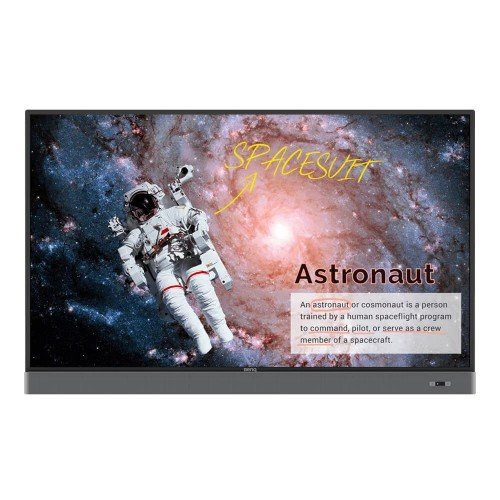
BenQ RM6502S 65 inch UHD Education Interactive Flat Panel Display is a class interactive display from Benq. The RM6502S Brings an Eye-Care solution, but it is also installed with a proficient cloud whiteboard for enhanced class participation and fostering collaboration with students beyond locations and platforms. EZWrite 5 streamlines classroom discussions by making it smoother than ever for teachers and students to share ideas, notes, and opinions as if they are annotating on the same whiteboard no matter where they are, along with cloud features. Furthermore, with the AMS service, it will be possible for teachers to access teaching materials stored in cloud storage and start the class directly with BenQs IFP.
BenQ EZWrite 5 is the leading annotation solution for interactive and collaborative classroom scenarios. Teachers and students can enjoy enhanced interactivity by using EZWrite Cloud Whiteboard to collect, categorize, edit, and share notes between the IFP and mobile devices. EZWrite 5 permits teachers to directly download and upload files to cloud services, such as Google Drive and Dropbox. Exclusive to EZWrite 5, this convenient cloud access makes it easy for teachers to modify their materials and bring them everywhere. EZWrite 5 comes with dual pens that allow two users to write or draw simultaneously with different colors, making it ideal for lively classroom activities. EZWrite 5 is ideal for creative, inspired creation in art classes. Users are guaranteed to enjoy an effortless experience that feels like writing and drawing with actual pens and brushes. EZWrites built-in Floating Tool empowers teachers to write on top of any app, video, website, document, or image. Whether using Windows, Mac, Chrome, or Android, a teacher can take notes on top of any on-screen content and save them. Screen capture, allows users to capture all or just part of the screen with two fingers in both hands. The Floating Tool also offers a smooth writing experience when used with HDMI, VGA, DP, and other signal sources, ensuring maximum flexibility. EZWrites handwriting recognition feature allows users to instantly convert written text, numbers, forms, and drawings into easily legible digital text without having to switch modes. The wireless X-Sign Broadcast can push alerts, messages, and announcements during class. Unlike traditional classroom messaging systems, X-Sign Broadcast ensures immediate message delivery as well as group notification. Serving as a next-generation information center, X-Sign Broadcast lets users manage class time content and broadcast enriching material from any device. With its grouping function, X-Sign Broadcast can send messages to a selected group of screens, a single classroom, or the whole school. The grouping function ensures information is only sent to the recipients for whom its intended, while also reducing the time and labor required to send messages to multiple people.
BenQ's new education IFPs fine-tune handwriting experience with an advanced fine IR touch that further reduces the gap between the actual landing point and the point displayed on the screen. by providing smart eye-care technology, BenQ IFP ensures classrooms can embrace innovation without compromising student health by providing smart eye-care technology. The Smart Eye-Care solution can function intuitively with the help of the embedded motion sensor. For a smooth and comfortable viewing experience, BenQ IFP will automatically activate Flicker-Free and Low Blue Light features by detecting the movement of users close to the screen. To provide uninterrupted learning for students, RM6502 streamlines the steps for teachers to start classes with BenQ Launcher. Created to aggregate all key tools in one hub, BenQ Launcher allows teachers to start using the EZWrite whiteboard as well as accessing various input sources in a single tap without logging into their accounts. Teachers can also put announcements on the message board. Additionally, BenQ Launcher comes with SwitchQ, a task switcher, letting teachers effortlessly switch between recent apps and input signal sources at their fingertips. BenQ's IFPs support multi-account management which allows users to directly access and manage their personal system-setting, network drive, and cloud storage space such as google drive and Dropbox. InstaShare is the software designed for allowing the smooth streaming of visual, audio files, and Full HD quality videos. Users can also mirror and control all digital content across the devices including BenQ IFP, PCs, tablets, and smartphones, empowering contributors to enrich their sessions with a variety of multimedia resources.
RM6502 repositions the two 16W speakers to the front, offering better sound transmission that elevates the level of audiovisual enjoyment during classes. Additionally, RM6502 comes with a Mic-In port that allows teachers to connect external microphones, further facilitating an impactful and effective learning experience for students. RM6502 supports dual display application through HDMI out, permitting teachers to share teaching materials to more than one screen and increasing the efficiency of teaching and student engagement.
The latest price of BenQ RM6502S 65 inch UHD Education Interactive Flat Panel Display in Bangladesh is 350,000৳ You can buy the BenQ RM6502S 65 inch UHD Education Interactive Flat Panel Display at best price from our Website or visit any of our showrooms.